![Finger Throttle/Display suit select Dragon GTR/GTS inc V2 & Cyclone [JP]](https://d2j6dbq0eux0bg.cloudfront.net/images/60508924/products/564678601/3686819099.jpg "Finger Throttle/Display suit select Dragon GTR/GTS inc V2 & Cyclone [JP]")
Finger Throttle/Display suit select Dragon GTR/GTS inc V2 & Cyclone [JP]
SKU JP-FINGER-THROTTLE-48/BLUE
AU$72.73
Bulk pricing available for quantities of 2 units or more
Cosmetic display version
Available in original blue LCD or colour variant.
In stock: 6 available
1
Buy more, save more
| Quantity | Price per item | Discount |
| 2 items | AU$65.45 | 10% off |
| 4 items | AU$59.09 | 19% off |
Save this product for later
Customer reviews
Reviews only from verified customers
No reviews yet. You can buy this product and be the first to leave a review.
Finger Throttle/Display suit select Dragon GTR/GTS inc V2 & Cyclone [JP]
Product Details
Brand: Dragon JP by eScootNow
- Suits select Dragon GTR, GTS, GTR V2, GTS V2, Cyclone and Cyclone Pro models, specifically earlier models (typically pre-2025) which connect to throttle via a flat black 6-pin JST SM female connector, located inside the rear cover of the display/throttle housing.
- Not suitable for newer (typically 2025 and beyond) which have a round M8 6-pin male connector.
- Available in two variants:
- Blue LCD backlight (as per shown on the wooden workbench), or
- Colour TFT model as shown at top of product image with white background.
The blue backlit LCD version provides improved readability in bright light environments (sun). For daytime use, blue backlit LCD is better. The throttle lever mechanism on the Colour version is slightly longer, possibly better suited to larger fingers.
- Typically P1 is defaulted to 48v, supporting systems of 36-60V.
- Includes handlebar mount bracket and the screws.
- Typically required as replacement when original throttle/display is water ingress or has physical damaged, although sometimes these things just die without explanation.
- JP Factory Spare (Jipin), as adopted in these Dragon branded models.
Notes:
- The controller OEM (JP) has a conversion cable to M8 male male plug (6-pin), which presents pinouts as shown below. Include comment at checkout if you need an M8 male with these pinouts. It is not known if these pinouts are adopted in the Dragon M8 models.
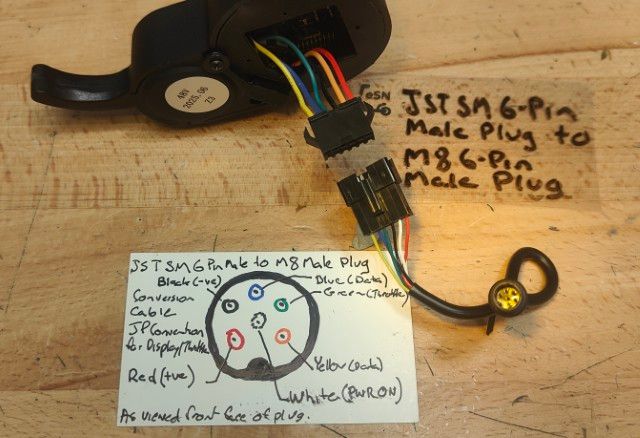
- This is not a replacement for throttle/display marked with JH-01 (Dragon X1 and GT 2021 model) which can be sourced from Bike Scooter City.
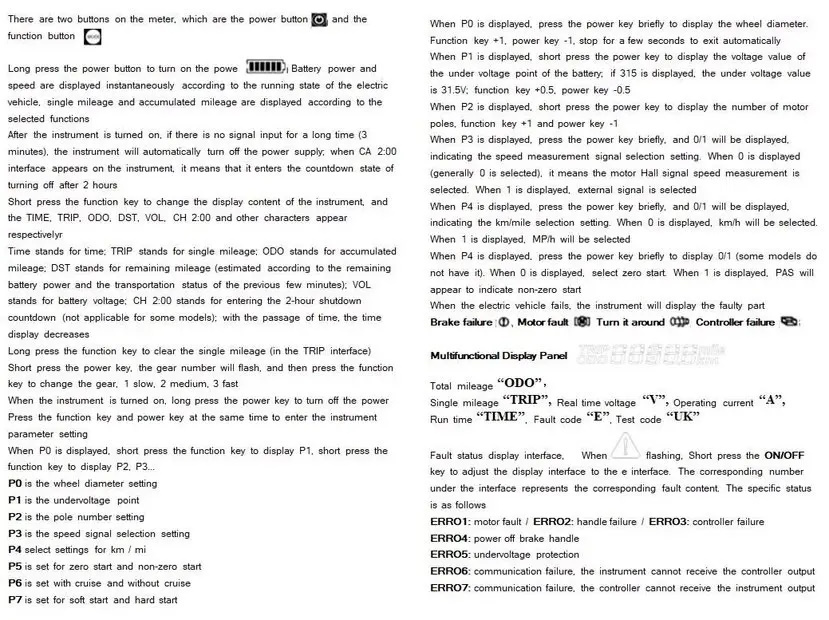
- Manufacturer instructions - image and transcribed.
1. Button
There are two buttons on the meter, which are power button and function button.
2. Use
Long press the power button to turn on the power. The battery power and speed are instantaneously displayed according to the running status of the electric vehicle, and the single mileage and accumulated mileage are displayed according to the selected functions.
After the meter is turned on, if there is no signal input for a long time (3 minutes), the meter will automatically turn off the power;
Short press the power button to change the display content of the meter, and characters such as TRIP, ODO, VOL, etc. appear respectively. When it displays 00:00, it indicates the time. When it displays TRIP, it indicates the single mileage. When it displays ODO, it indicates the accumulated mileage. When it displays VOL, it indicates the battery. Voltage;
Long press the function key to reset the mileage once (under the TRIP interface).
Short press the function key to change the gear, 1 is slow, 2 is medium, 3 is fast.
When the meter is turned on, press and hold the power button again to turn off the power.
3. Parameter setting
When the function key and the power key are pressed at the same time, it enters the instrument parameter setting state:
When P0 is displayed, short press the function key +1, short press the function key -1, P2, P3, P4, P5, P6, P7, P8, P9, P10 will be displayed; respectively: P0 is the wheel diameter setting; Pressure point setting; P2 is magnetic pole logarithm setting; P3 is speed signal selection setting; P4 km/mile selection setting; P5 is non-zero start and zero start selection setting; P6 is cruise and no cruise selection setting; P7 is soft start and hard start selection setting; P8 is percentage speed limit adjustment; P9 is ebs brake strength adjustment; P10 function is to be determined;
When P0 is displayed, the wheel length value will be displayed below, long press the function key, the value will flash, you can press the function key to increase by 1, or press the power key to decrease by 1. Long press the function key to exit, and select other parameters for debugging. (Other parameter settings are the same as above)
When P1 is displayed, the voltage value of the battery undervoltage point will be displayed below; if it displays 31.5, it means that the undervoltage value is 31.5 volts; to change the undervoltage value, long press the function key and the value will flash, then short press the function key to add 0.5 , you can press the power button to subtract 0.5;
When P2 is displayed, the number of pole pairs of the motor will be displayed below. Press and hold the function key, and the value will flash. You can press the function key to increase by 1, or press the power key to decrease by 1;
When P3 is displayed, 0 or 1 will be displayed below; it indicates the speed measurement signal selection setting. When 0 is displayed (usually 0 is selected), it indicates that the motor Hall signal speed measurement is selected. When 1 is displayed, an external signal is selected. Long press the function key, the value will flash, you can press the function key to select 1, or press the power key to select 0;
When P4 is displayed, 0 or 1 will be displayed below, indicating the optional setting of kilometres/miles. When 0 is displayed, select kilometres, and Km/h will be displayed; when 1 is displayed, select miles, and Mp/h will be displayed;
When P5 is displayed, 0 or 1 will be displayed below, which means zero start and non-zero start selection (some models do not have it); when 0 is displayed, it means zero start; when 1 is displayed, PAS will appear, which means non-zero start;
When P6 is displayed, 0 or 1 will be displayed below (some models do not have it); it means there is cruise and no cruise selection, when 0 is displayed, it means no cruise; when 1 is displayed, it means cruise, and the symbol is displayed at the same time;
When P7 is displayed, 0 or 1 is displayed below, which means hard start and soft zero start selection (some models do not have it); when 0 is displayed, it means soft start (soft start); when 1 is displayed, it means hard start, and it is displayed at the same time N-SOFT (high momentum when starting);
When P8 is displayed, the bottom will display 100 by default (the adjustment range is between 5-100), long press the function key, the value will flash, you can press the function key to add 1, or press the power key to subtract 1; (for example: set 80, means 80 percent of full speed, and so on)
When P9 is displayed, the ebs brake strength value is displayed below, long press the function key, the value will flash, you can press the function key to add 1, or press the power key to subtract 1; (some models do not)
4. Fault display
When the electric vehicle fails, the instrument will display the faulty parts, including brake fault, motor fault, handlebar fault, controller fault, etc.
5. Function display
Some functions of the instrument will display symbols, respectively, headlights on, USB charging.
6. Harness definition
Red: VCC, Orange: Electric door lock, Black: Grounding, Green: Hall signal, Blue: Signal sending, Yellow: Signal receiving.
You May Also Like
![Main Cable suit Display/Throttle Dragon GTR/GTS inc V2 & Cyclone (JST SM 6-pin) [JP]](https://d2j6dbq0eux0bg.cloudfront.net/images/60508924/products/713111176/4671624872.jpg "Main Cable suit Display/Throttle Dragon GTR/GTS inc V2 & Cyclone (JST SM 6-pin) [JP]")
![Main Cable suit Display/Throttle Dragon GTR/GTS inc V2 & Cyclone (JST SM 6-pin) [JP]](https://d2j6dbq0eux0bg.cloudfront.net/images/60508924/products/713111176/4671624877.jpg)
![52V 25A Controller suit Dragon Cyclone Pro (Black JST Connectors) [JP]](https://d2j6dbq0eux0bg.cloudfront.net/images/60508924/4319299035.jpg "52V 25A Controller suit Dragon Cyclone Pro (Black JST Connectors) [JP]")
![52V 25A Controller suit Dragon Cyclone Pro (Black JST Connectors) [JP]](https://d2j6dbq0eux0bg.cloudfront.net/images/60508924/4297925820.jpg)
52V 25A Controller suit Dragon Cyclone Pro (Black JST Connectors) [JP]
52V 25A Controller suit Dragon Cyclone Pro (Black JST Connectors) [JP]
Replacement factory controllers
AU$100.00
![48V 25A Controller suit Dragon GTR V2, GTS V2, 48V GTR & Dragon Cyclone (8" Dual) (Black JST SM connectors) [JP]](https://d2j6dbq0eux0bg.cloudfront.net/images/60508924/products/570984122/4087762898.jpg "48V 25A Controller suit Dragon GTR V2, GTS V2, 48V GTR & Dragon Cyclone (8\" Dual) (Black JST SM connectors) [JP]")
![48V 25A Controller suit Dragon GTR V2, GTS V2, 48V GTR & Dragon Cyclone (8" Dual) (Black JST SM connectors) [JP]](https://d2j6dbq0eux0bg.cloudfront.net/images/60508924/products/570984122/4297940603.jpg)
![48V 20A (25A) Controller suit Dragon GTS non-V2, later 48V models [JP]](https://d2j6dbq0eux0bg.cloudfront.net/images/60508924/products/655503460/4319226971.jpg "48V 20A (25A) Controller suit Dragon GTS non-V2, later 48V models [JP]")
![48V 20A (25A) Controller suit Dragon GTS non-V2, later 48V models [JP]](https://d2j6dbq0eux0bg.cloudfront.net/images/60508924/products/655503460/4297940603.jpg)
48V 20A (25A) Controller suit Dragon GTS non-V2, later 48V models [JP]
48V 20A (25A) Controller suit Dragon GTS non-V2, later 48V models [JP]
Replacement factory controllers
AU$81.82
![36V 19A Controller suit Dragon GTS and GTR non-V2, earlier 36V models [JP]](https://d2j6dbq0eux0bg.cloudfront.net/images/60508924/products/655503448/4319261297.jpg "36V 19A Controller suit Dragon GTS and GTR non-V2, earlier 36V models [JP]")
![36V 19A Controller suit Dragon GTS and GTR non-V2, earlier 36V models [JP]](https://d2j6dbq0eux0bg.cloudfront.net/images/60508924/products/655503448/4297940603.jpg)
36V 19A Controller suit Dragon GTS and GTR non-V2, earlier 36V models [JP]
36V 19A Controller suit Dragon GTS and GTR non-V2, earlier 36V models [JP]
Replacement factory controllers
AU$81.82
![TurboCharge Charger 58.8V for 52V GX16-3F 2A [GJS150]](https://d2j6dbq0eux0bg.cloudfront.net/images/60508924/products/589877608/5824914324.jpg "TurboCharge Charger 58.8V for 52V GX16-3F 2A [GJS150]")
![TurboCharge Charger 58.8V for 52V GX16-3F 2A [GJS150]](https://d2j6dbq0eux0bg.cloudfront.net/images/60508924/products/589877608/5824914330.jpg)
TurboCharge Charger 58.8V for 52V GX16-3F 2A [GJS150]
TurboCharge Charger 58.8V for 52V GX16-3F 2A [GJS150]
Typically suited to Dragon Raptor and early models of Cyclone etc.
AU$61.82
![TurboCharge Charger 54.6V for 48V GX16-3F 1.5/2A [GJS150 | XQH126]](https://d2j6dbq0eux0bg.cloudfront.net/images/60508924/products/536338553/5824788458.jpg "TurboCharge Charger 54.6V for 48V GX16-3F 1.5/2A [GJS150 | XQH126]")
![TurboCharge Charger 54.6V for 48V GX16-3F 1.5/2A [GJS150 | XQH126]](https://d2j6dbq0eux0bg.cloudfront.net/images/60508924/products/536338553/4297913985.jpg)
TurboCharge Charger 54.6V for 48V GX16-3F 1.5/2A [GJS150 | XQH126]
TurboCharge Charger 54.6V for 48V GX16-3F 1.5/2A [GJS150 | XQH126]
Suits early model (1st gen) Dragon GTS & GTR (inc V2) & Cyclone (8"), all Slayer and Zero 8&9.
AU$58.18
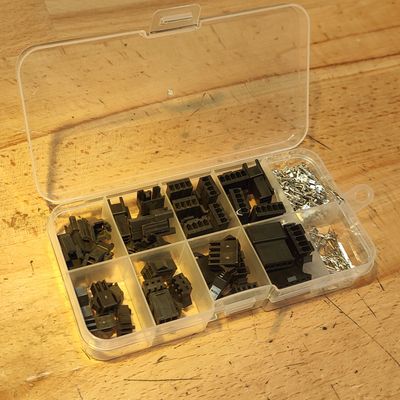
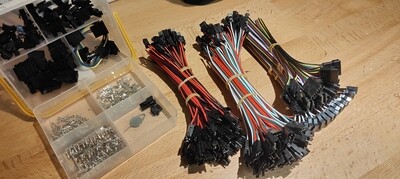
JST SM Connectors and Cables (Black)
JST SM Connectors and Cables (Black)
Internal wiring connectors
AU$18.18
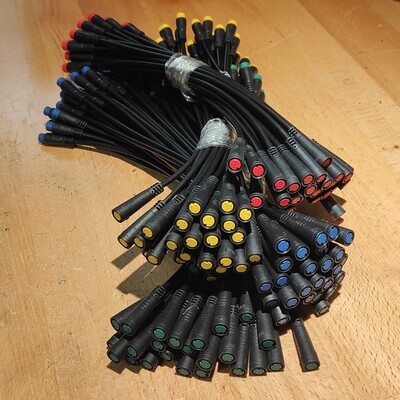
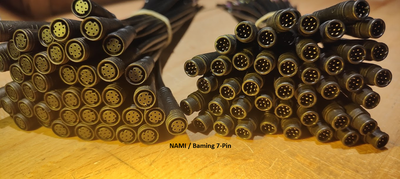
TurboTap M6 & M8 Waterproof "eBike" Cables (Julet / Okfeet / Higo / BMING)
TurboTap M6 & M8 Waterproof "eBike" Cables (Julet / Okfeet / Higo / BMING)
Waterproof Electric bike / eScooter cables for throttle/display, brakes etc
AU$8.18
Display prices in:AUD